> ## Documentation Index
> Fetch the complete documentation index at: https://docs.paxos.com/llms.txt
> Use this file to discover all available pages before exploring further.
# Roles and Responsibilities
> Learn about org-level and entity-level roles for controlling Dashboard access.
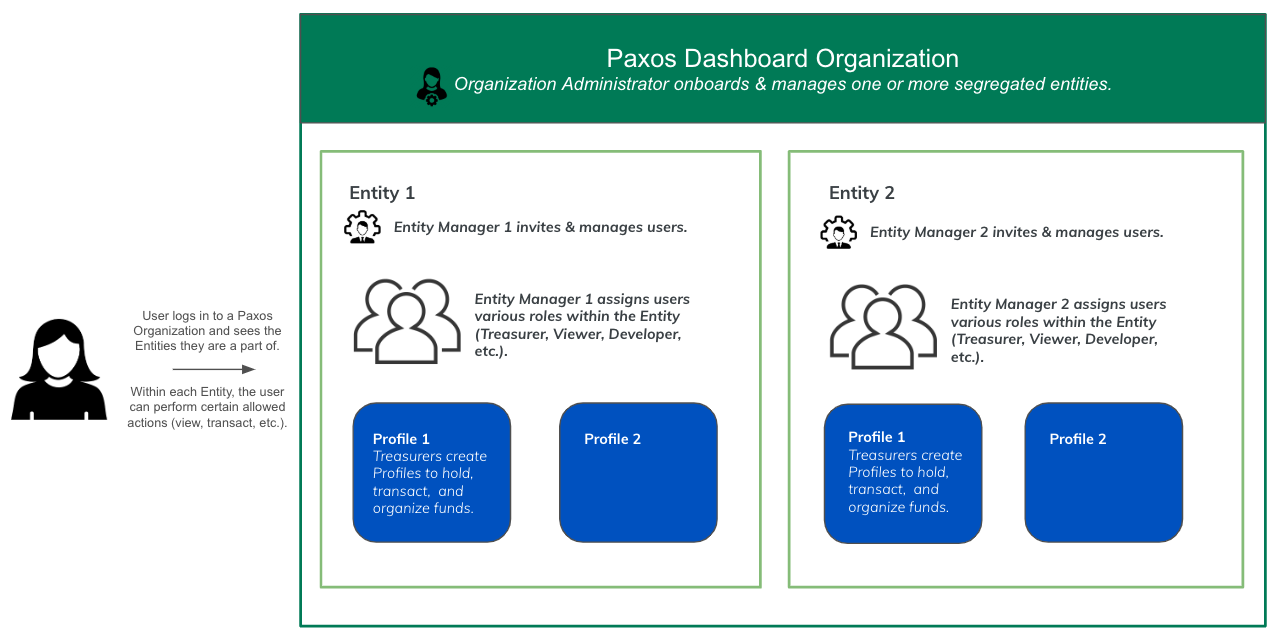
Paxos offers a granular access management system that allows you to customize the level at which you control access to various Dashboard actions. Users looking for basic functionality have access to pre-defined Paxos Managed roles made up of a set of permissions. For more flexibility, create your own Custom Roles to combine permissions into new roles with more granular access control.
Roles can be defined at either the **Organization level** or the **Entity level**. Role assignments and the permissions they grant are always applied at the entity level.
* **Org-Level Roles** — Defined by an Organization Administrator and available across all entities within the Organization.
* **Entity-Level Roles** — Defined within a specific entity and not available in other entities. Users can have different roles in different entities.
 Have questions about your role and access?
Contact your [Entity Manager](#entity-manager) for help.
## Organization Administrator
All Organizations have at least one Organization Administrator with permission to onboard Entities. Organization Administrators who complete the onboarding for an Entity automatically become the [Entity Manager](#entity-manager) for that Entity.
## Entity Manager
Entity Managers assign roles, add users, map identity provider groups to roles, etc. Entity Managers can [review Entity specific settings](https://dashboard.paxos.com/admin). Entity Managers can be reassigned once an Entity has been created. Entity Managers have view permissions across the Dashboard, but cannot perform treasury focused actions.
> Use the Entity ID on the [ Admin > Entity Settings](https://dashboard.paxos.com/admin) when contacting [Support](https://support.paxos.com).
## Treasurer
The Treasurer role enables users to:
* Create Profiles and update balances.
* Deposit, transfer and withdraw supported assets.
* Mint, convert and redeem Paxos-issued stablecoins.
* View reports.
## Approver
The Approver can approve or reject any submitted action that requires [Approvals](https://docs.paxos.com/dashboard/admin/approvals).
## Developer
The Developer can view, create, update and delete [API credentials](https://dashboard.paxos.com/admin/api).
## Viewer
A Viewer has read-only access to view user roles and permissions, cash and crypto balances, deposit and transfer details, API keys, reports as well as conversion information.
## Operations
Has read-only access across dashboard features with additional permissions for onboarding.
## Custom Roles
Custom roles enable organizations to define granular access control for users by specifying a tailored set of permissions and actions beyond the above predefined role templates.
Some permissions will be flagged as `Requires KYC`. Permissions that enable the movement of funds (either on/off platform or between entities) require users to be [KYC verified](/guides/dashboard/verified-users-for-sensitive-permissions) before being able to use them.
### Org-Level Custom Roles
Organization Administrators can create custom roles that are available across all entities in the Organization. Once created, the role can be assigned to users within any individual entity in the Organization.
Have questions about your role and access?
Contact your [Entity Manager](#entity-manager) for help.
## Organization Administrator
All Organizations have at least one Organization Administrator with permission to onboard Entities. Organization Administrators who complete the onboarding for an Entity automatically become the [Entity Manager](#entity-manager) for that Entity.
## Entity Manager
Entity Managers assign roles, add users, map identity provider groups to roles, etc. Entity Managers can [review Entity specific settings](https://dashboard.paxos.com/admin). Entity Managers can be reassigned once an Entity has been created. Entity Managers have view permissions across the Dashboard, but cannot perform treasury focused actions.
> Use the Entity ID on the [ Admin > Entity Settings](https://dashboard.paxos.com/admin) when contacting [Support](https://support.paxos.com).
## Treasurer
The Treasurer role enables users to:
* Create Profiles and update balances.
* Deposit, transfer and withdraw supported assets.
* Mint, convert and redeem Paxos-issued stablecoins.
* View reports.
## Approver
The Approver can approve or reject any submitted action that requires [Approvals](https://docs.paxos.com/dashboard/admin/approvals).
## Developer
The Developer can view, create, update and delete [API credentials](https://dashboard.paxos.com/admin/api).
## Viewer
A Viewer has read-only access to view user roles and permissions, cash and crypto balances, deposit and transfer details, API keys, reports as well as conversion information.
## Operations
Has read-only access across dashboard features with additional permissions for onboarding.
## Custom Roles
Custom roles enable organizations to define granular access control for users by specifying a tailored set of permissions and actions beyond the above predefined role templates.
Some permissions will be flagged as `Requires KYC`. Permissions that enable the movement of funds (either on/off platform or between entities) require users to be [KYC verified](/guides/dashboard/verified-users-for-sensitive-permissions) before being able to use them.
### Org-Level Custom Roles
Organization Administrators can create custom roles that are available across all entities in the Organization. Once created, the role can be assigned to users within any individual entity in the Organization.
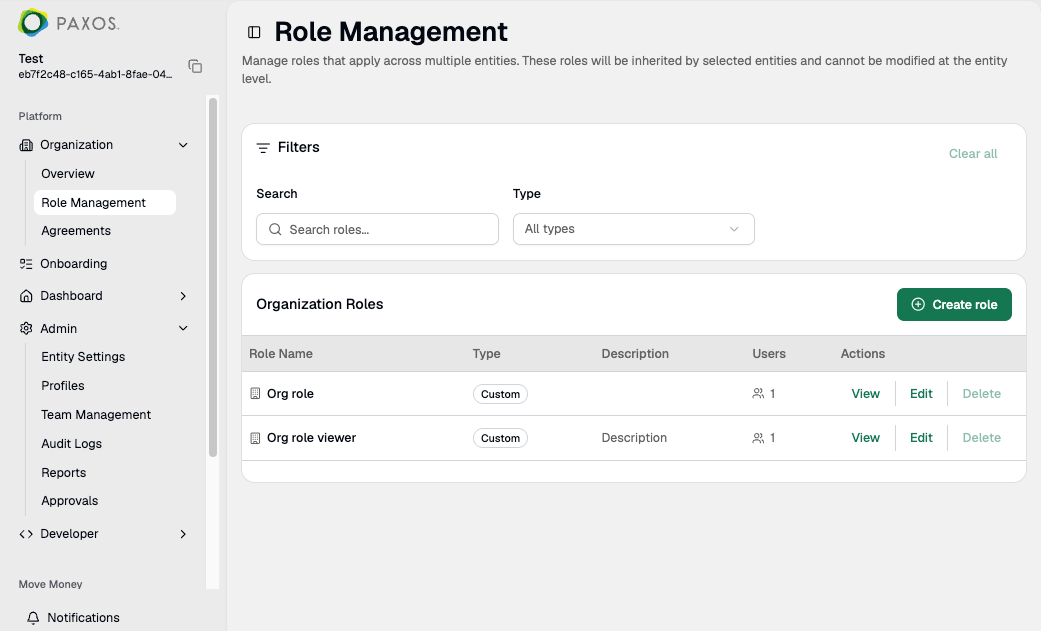 To create an org-level custom role:
1. Go to [**Organization > Role Management**](https://dashboard.paxos.com/organization/roles).
2. Click **Create role**.
3. Enter a unique name and an optional description. Click **Next**.
4. Choose permissions for this role. Click **Next**.
5. Review and confirm the role. Click **Save**.
The role becomes available for Entity Managers to assign within their entities.
### Entity-Level Custom Roles
Users with the **Can create custom role** permission can create custom roles scoped to their specific entity. These roles are not available in other entities within the Organization.
> Any org-level roles created by an Organization Administrator are automatically visible here. Select **Manage organization roles** to view or edit them at [**Organization > Role Management**](https://dashboard.paxos.com/organization/roles).
To create an org-level custom role:
1. Go to [**Organization > Role Management**](https://dashboard.paxos.com/organization/roles).
2. Click **Create role**.
3. Enter a unique name and an optional description. Click **Next**.
4. Choose permissions for this role. Click **Next**.
5. Review and confirm the role. Click **Save**.
The role becomes available for Entity Managers to assign within their entities.
### Entity-Level Custom Roles
Users with the **Can create custom role** permission can create custom roles scoped to their specific entity. These roles are not available in other entities within the Organization.
> Any org-level roles created by an Organization Administrator are automatically visible here. Select **Manage organization roles** to view or edit them at [**Organization > Role Management**](https://dashboard.paxos.com/organization/roles).
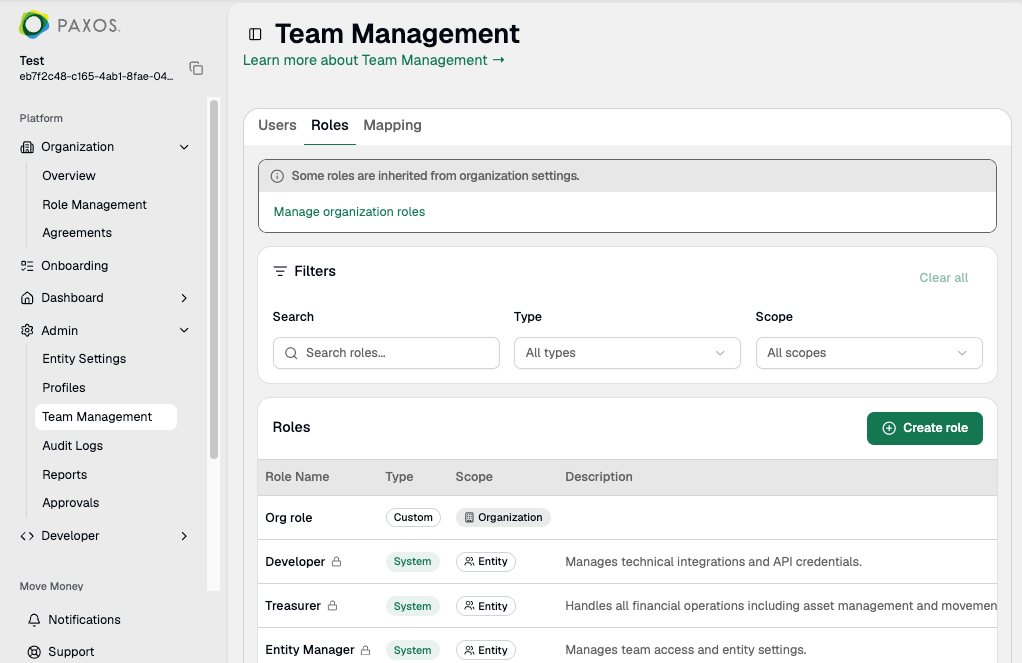 To create an entity-level custom role:
1. Go to [**Admin > Team Management > Roles**](https://dashboard.paxos.com/admin/team-management/roles).
2. Click **Create role**.
3. Enter a unique name and an optional description. Click **Next**.
4. Choose permissions for this role. Click **Next**.
To create an entity-level custom role:
1. Go to [**Admin > Team Management > Roles**](https://dashboard.paxos.com/admin/team-management/roles).
2. Click **Create role**.
3. Enter a unique name and an optional description. Click **Next**.
4. Choose permissions for this role. Click **Next**.
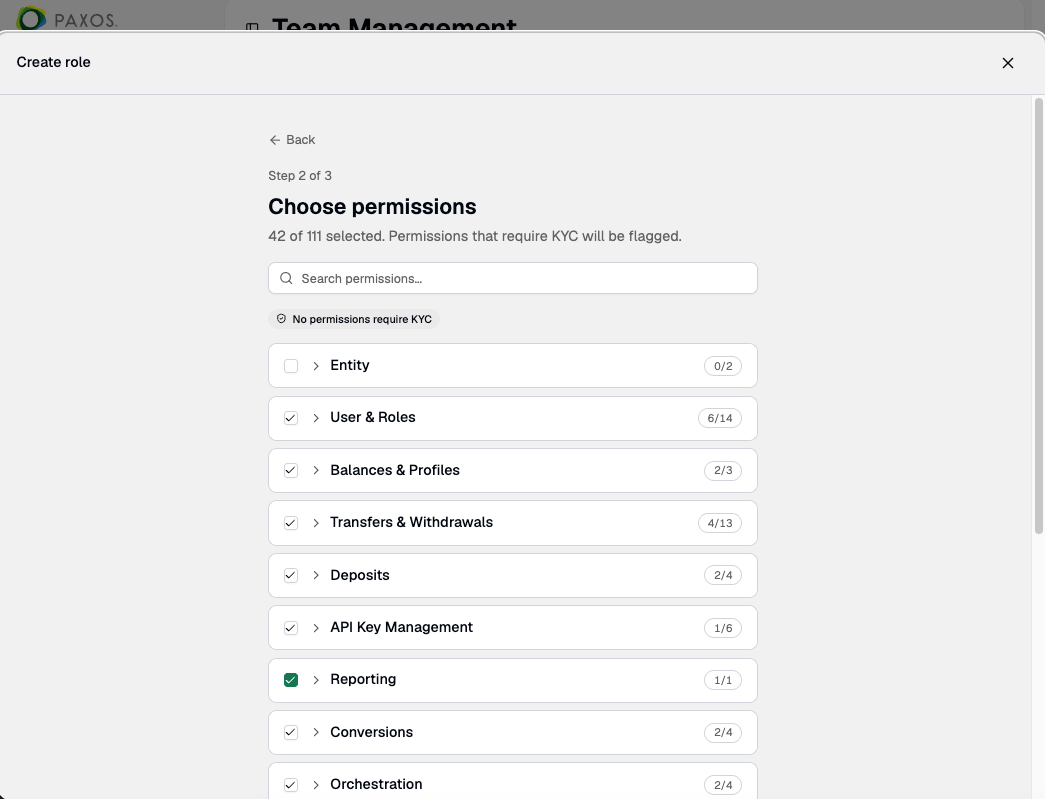 5. Review and confirm the role. Click **Save**.