What is the Rewards Engine?

The Rewards Engine automates the tracking, calculation, and distribution of rewards to partners. The Rewards Engine is designed as a Paxos platform capability, so it supports any stablecoin configured for rewards through Paxos. Partners interact through the Paxos Dashboard, the API, directly with the smart contract, or any combination of these interfaces.

Who is this for?

Distribution partners holding or distributing rewards-eligible stablecoins who want to manage their downstream rewards program with ease. This guide covers content relevant to account managers, developers, finance, product, and program managers.

How it works

The Rewards Engine currently processes custody rewards. Support for additional reward types and tracking and calculation capabilities may be added based on customer needs.

Custody rewards flow

1

Submit wallets

Register reward addresses for monitoring.
2

Daily snapshot

Balances are captured on-chain.
3

Rewards calculation

The applicable rate is multiplied by the captured balance.
4

Payouts

Rewards are claimed to the assigned payout group.
5

Reporting

Activity is reflected in the Dashboard and via the API.

Key concepts

Access and interfaces

Distribution partners access the Rewards Engine through three primary surfaces: the Paxos Dashboard, the API, and direct smart contract interaction.

Dashboard

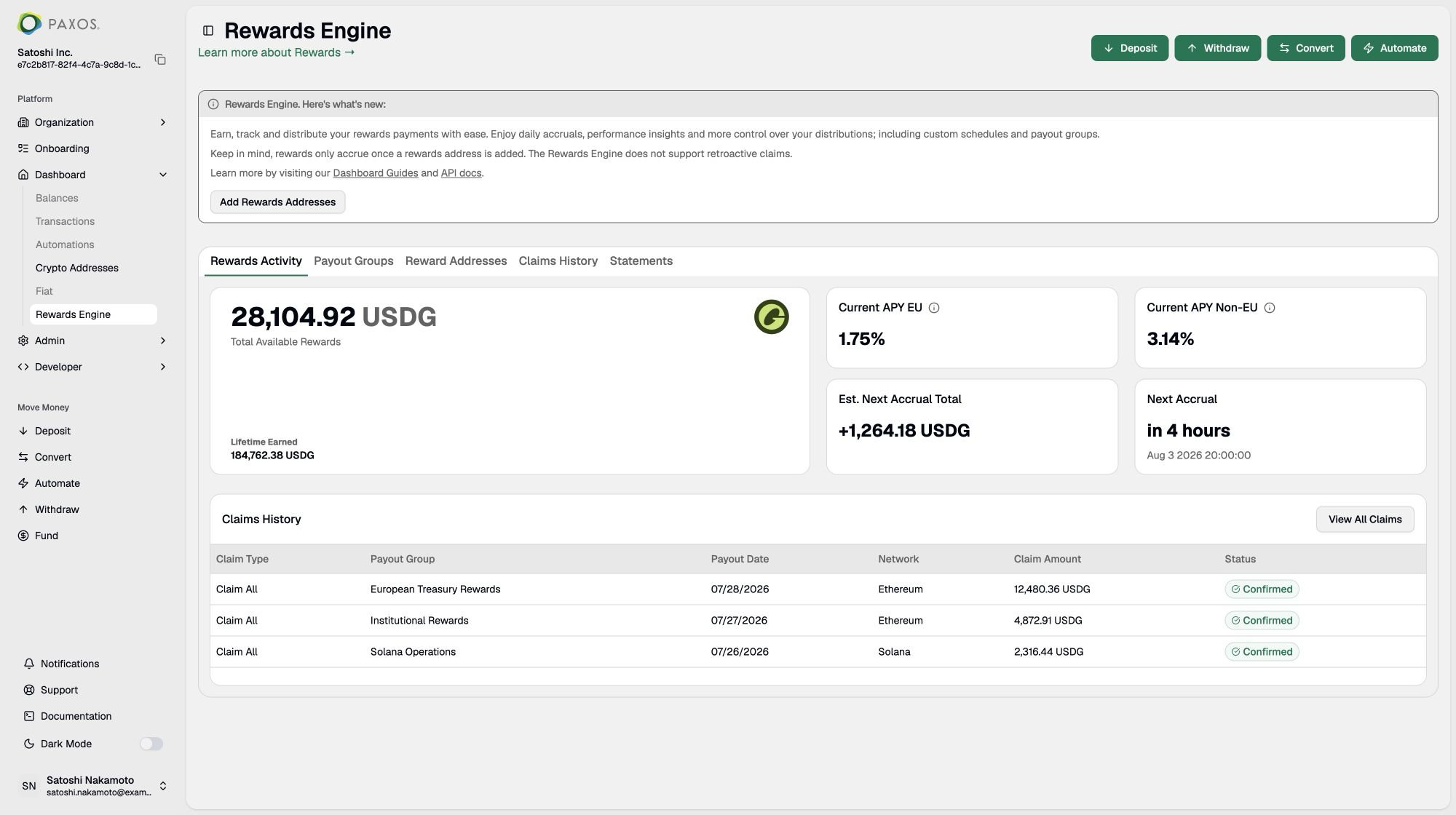
The Dashboard provides a daily view of Rewards Engine activity, including:
  • Rewards summary: total lifetime earned, available to claim, and estimated next accrual.
  • Current earnings rate and next accrual period.
  • Payout group overview with balance and destination address.
  • Claims history: per-period payout amounts.
  • Rewards wallet list per payout group.

API

The API supports both programmatic queries and configuration. Most features available in the Dashboard are also supported through the API. See the Rewards Engine API reference for details.

Scope and roadmap

The following table summarizes what’s supported today and what’s planned. Customer feedback directly shapes this roadmap.
Things to plan around
  • Claims run automatically — partners cannot trigger manual payouts today.
  • No retroactive claims. Wallets only accrue rewards once you submit them.
  • You must add a payout wallet (the destination address that receives your rewards) to accrue rewards. Payout wallets are chain-specific; submit one for each chain where you hold a rewards-eligible stablecoin.

Frequently asked questions

Rates for the selected stablecoin are always visible in the Rewards Engine Dashboard and are broken down by jurisdiction. The displayed rate is net of management fees, so what you see is what you earn. The rate is not expected to change intraday and is generally stable, although it can shift with broader market conditions, such as changes to the federal funds rate.
Rewards Engine Dashboard showing current APY by jurisdiction

Rewards rates by jurisdiction. The rates shown are illustrative and do not represent actual rates.

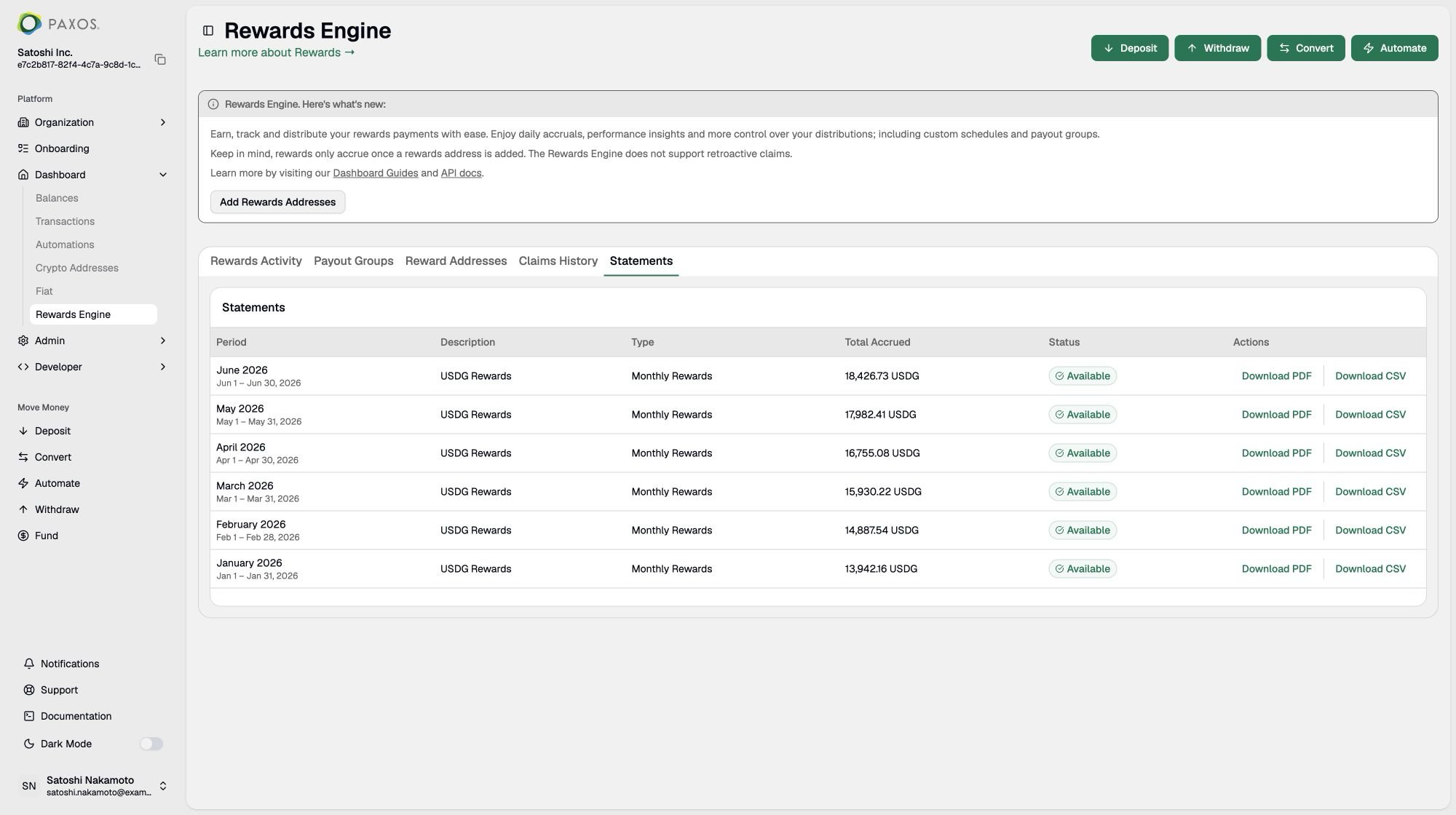
Yes. A detailed monthly statement is available in the Dashboard under the Statements tab. It shows your accrued rewards and the monthly rate used to calculate them, net of management fees.To find a statement, log in to the Paxos Dashboard, open Rewards Engine, and select Statements. You can view or download any month as a PDF. See View statements for more details.
Rewards Engine Statements tab with monthly statements available for download

Monthly rewards statements in the Paxos Dashboard.

Yes. Addresses must be submitted and in ACTIVE status in the Dashboard before Paxos can attribute rewards to them. Submit addresses early to avoid missing any accrual. Rewards are not retroactive. See Submit wallets for instructions.
A payout address is the destination where your claimed rewards are sent. Payout addresses are chain-specific: you need a separate payout address for each chain where you hold rewards-monitored addresses.A rewards-monitored address is where you hold a rewards-eligible stablecoin and earn rewards. A payout address is where rewards are sent. They can be the same address or different addresses. Rewards do not accrue for rewards-monitored addresses until you submit a payout address.You can use a Paxos deposit address as the payout destination to consolidate rewards in a single Paxos profile for withdrawal:
  1. Create or reuse a deposit address for the rewards-eligible stablecoin on the required network.
  2. Create a payout group on the same network and enter that deposit address as the destination address.
A rewards-monitored address, also called a rewards address, monitored-rewards address, monitoring address, or monitored wallet, is an address you submit that holds a rewards-eligible stablecoin. Paxos monitors its balance to calculate your rewards. Rewards accrue only on addresses submitted and confirmed in the Dashboard, beginning on the date you submit them.
Address verification confirms your claim eligibility for each rewards-monitored address. There is a 90-day grace period through October 30, 2026. After the grace period, previously submitted and new addresses must be verified before they can accrue rewards.Three verification methods are supported:
  1. Wallet signature: Sign a message from your wallet. This is the fastest and most self-service option.
  2. Small deposit test: Send a small on-chain transaction from the wallet to confirm ownership.
  3. Manual review: Use this option when a signature or small deposit test is not possible.
Verification protects your claim to a wallet if ownership is disputed. See Address verification in the Dashboard guide for more details.
Payout groups let you organize rewards-monitored addresses into groups, for example by entity, jurisdiction, product line, or customer segment. You can claim rewards for an entire group in a single transaction, and each group must have its own destination address.The Rewards Engine separates payout groups by jurisdiction because jurisdictions can earn different rates. Payout groups are also tied to a specific blockchain. Unlike the legacy model, which allowed only one payout group, the Rewards Engine supports multiple payout groups.
Rewards accrue daily based on a snapshot of the eligible stablecoin balance in your submitted rewards-monitored addresses at 23:59:59 UTC. Balances are grouped by stablecoin, chain, and jurisdiction. The Dashboard provides an up-to-date view of your earned rewards, the current rewards rate, the estimated next accrual, and when it is expected.
The Rewards Engine currently supports custody rewards. Submit the rewards-monitored addresses that hold rewards-eligible stablecoins. Where this rewards structure is permissible, Paxos monitors their balances and determines rewards using your rewards rate. Rewards accrue only on addresses that have been submitted.
No. Claims run automatically according to the schedule configured for each payout group. Claim schedules can run daily, weekly, or monthly, while rewards accrue daily regardless of the claim schedule. See Claim rewards for configuration details.
Rewards accrue every day, including weekends. Claims run according to each payout group’s daily, weekly, or monthly schedule, so rewards are paid on a weekend only when a claim is scheduled for that day. Accrued rewards compound daily until they are paid out.
To receive compound interest on rewards that have been paid out and remain idle in the payout address, register the payout address as a rewards-monitored address in its payout group.
Paxos currently covers the gas fees, so there is no cost to you for claiming rewards. This policy is subject to change.
The minimum balance for on-chain registration is $1 per address. This is not a claim payout threshold and is subject to change.
Yes. Reward details, including the rate, next accrual, lifetime earned, and claim history, are available through the API. You can also submit addresses and manage payout groups programmatically. See the Rewards Engine developer guide for an end-to-end walkthrough and links to each API section.
Supported chains vary by stablecoin. The Dashboard shows the networks available for the selected stablecoin. Contact your account manager or email support@paxos.com if you would like Paxos to support another chain.
The submission is rejected. If you believe the address was claimed in error, email support@paxos.com. Address verification helps ensure that partners claim only their wallets.

Questions or feedback?

Contact your account manager or email support@paxos.com with feedback, feature requests, or questions about onboarding.